flowchart TD
A[generate_alt_text.py<br/>Fetch metadata + call models] -->|runs/<timestamp>/*| B{Survey prep}
B --> C[clean_survey_data.py<br/>Sanitise Formspree export]
C --> D[process_survey_rankings.py<br/>Expand per object + rater ranks]
D --> E[process_best_answers.py<br/>Consensus winner per object]
D --> F[analyze_survey_time.py<br/>Timing summaries]
D --> G[ranking_tests.py<br/>Statistical tests + plots]
A --> H[viz_dataset.py<br/>Paper figures]
E --> I[analysis/<br/>CSVs + plots]
F --> I
G --> I
H --> J[paper/images/fig_type_era_*.png]
CHR 2025 Conference Materials
Seeing History Unseen: CHR 2025 Conference Materials
This repository contains the abstract and presentation materials for the CHR 2025 conference paper “Seeing History Unseen: Evaluating Vision-Language Models for WCAG-Compliant Alt-Text in Digital Heritage Collections” by Moritz Mähr (University of Bern and Basel) and Moritz Twente (University of Basel).



About This Repository
This repository hosts the conference materials for CHR 2025 (Conference on Computational Humanities Research) including:
- Abstract: A LaTeX document containing the complete abstract for our paper
- Presentation Materials: Slides and supporting materials for the conference presentation
- Documentation: Supporting documentation and setup instructions
Research Overview
Our research explores the feasibility, accuracy, and ethics of using state-of-the-art vision-language models to generate WCAG-compliant alt-text for heterogeneous digital heritage collections. We combine computational experiments with qualitative evaluation to develop a framework for responsible AI-assisted accessibility in the humanities.
Key Research Questions
- Feasibility: Can current vision-language models produce useful, WCAG 2.2–compliant alt-text for complex historical images when provided with contextual metadata?
- Quality and Authenticity: How do domain experts rate AI-generated image descriptions in terms of factual accuracy, completeness, and usefulness for understanding historical content?
- Ethics and Governance: What are the ethical implications of using AI to generate alt-text in heritage collections, and what human oversight or policy safeguards are required for responsible use?
Repository Structure
abstract/: Contains the LaTeX source, class files, and bibliography for the conference abstractpresentation/: Will contain presentation slides and supporting materialssrc/: Alt-text generation and survey analysis pipelinegenerate_alt_text.py: Batch alt-text generator that writes timestamped outputs toruns/clean_survey_data.py: Removes excluded submissions and email addresses from raw Formspree exportsprocess_survey_rankings.py: Expands cleaned submissions into per-object model rankings (survey_rankings.csv)process_best_answers.py: Aggregates consensus winners and texts per object (best_answers.csv)analyze_survey_time.py: Summarises completion times across objects and ratersranking_tests.py: Runs Friedman/Wilcoxon tests and produces comparison plots underanalysis/viz_dataset.py: Creates figure assets for the manuscript (paper/images/fig_type_era_*.png)playground.ipynb: Interactive Jupyter notebook for experimenting with the pipeline
runs/: Output directory for generated alt-text results, including raw API responses and CSV/JSONL/Parquet tablesdata/: Data directories for raw and cleaned datasets
Installation
We recommend using GitHub Codespaces for a reproducible setup.
Getting Started
For Most Users: Reproducible Setup with GitHub Codespaces
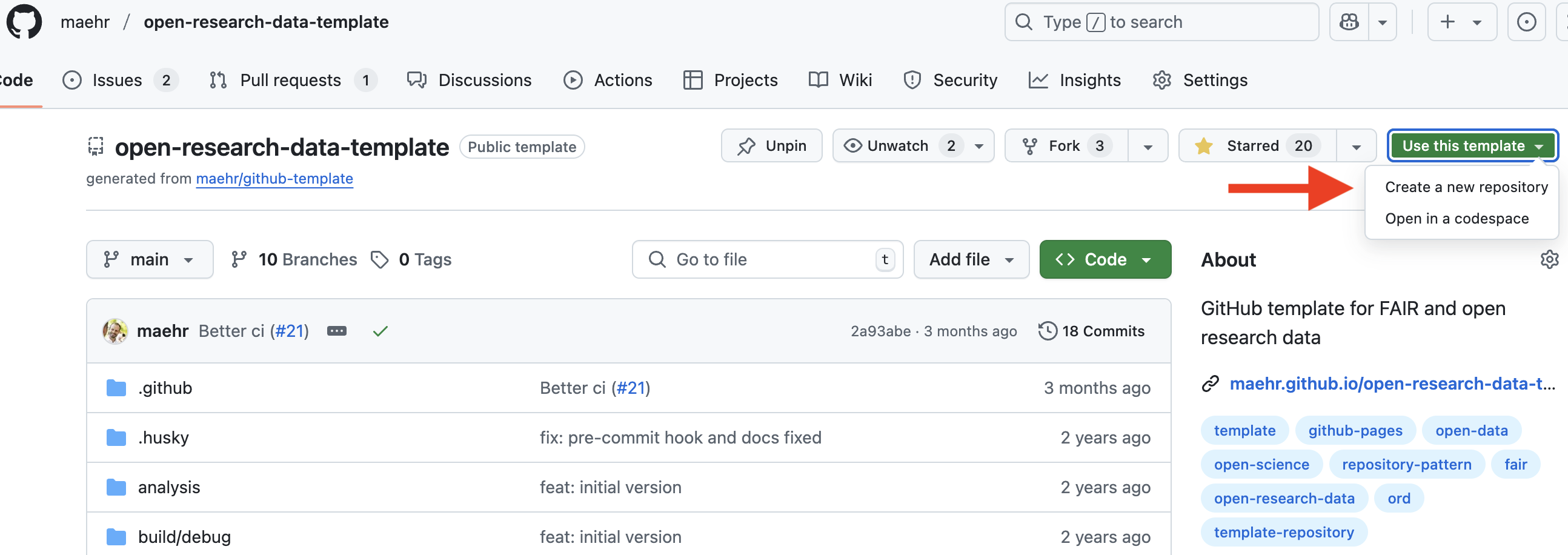
Use this template for your project in a new repository on your GitHub account.
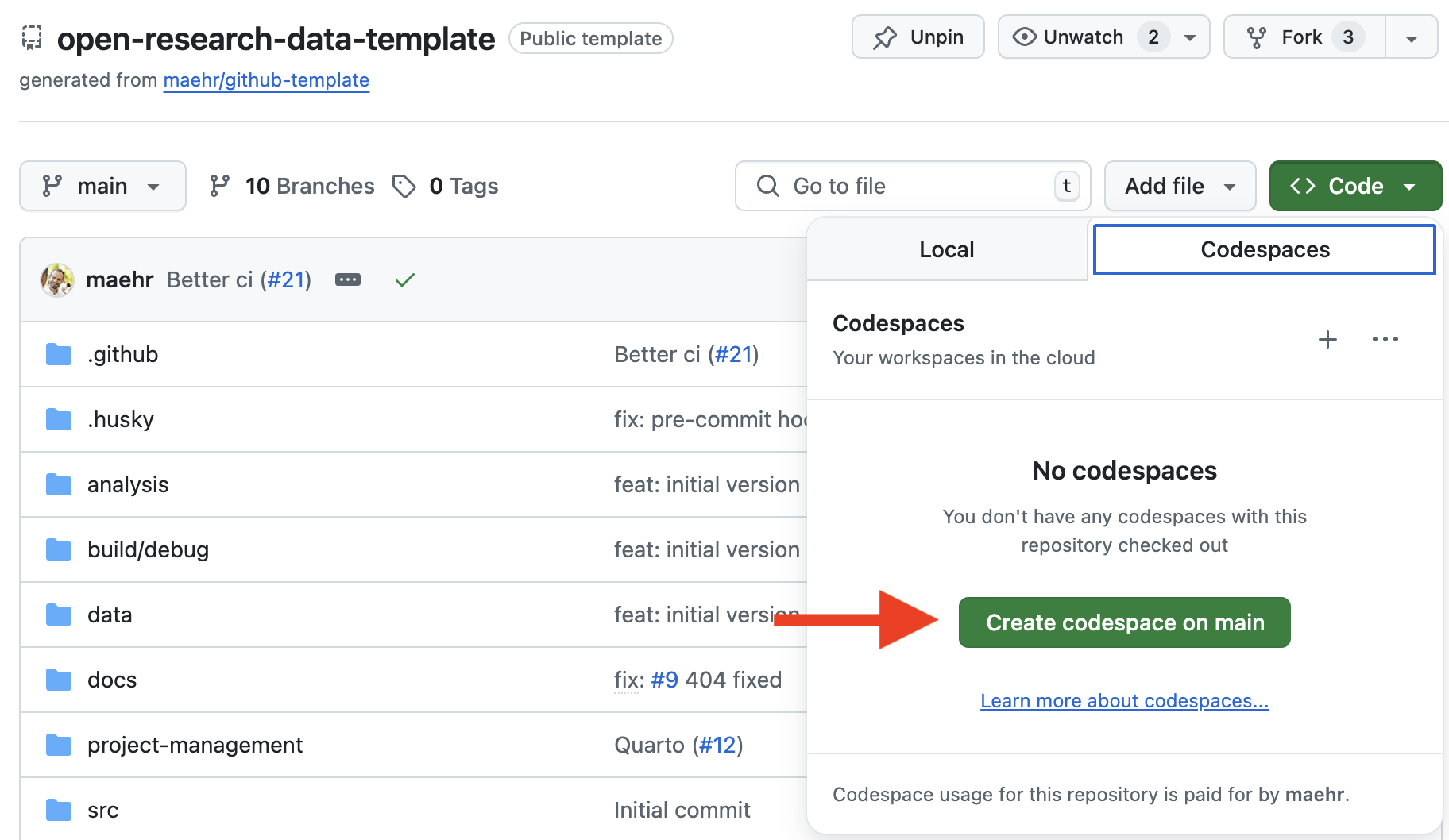
Click the green
<> Codebutton at the top right of this repository.Select the “Codespaces” tab and click “Create codespace on
main”. GitHub will now build a container that includes:- ✅ Node.js (via
npm) - ✅ Python with
uv - ✅ R with
renv - ✅ Quarto
- ✅ Node.js (via
Once the Codespace is ready, open a terminal and preview the documentation:
uv run quarto preview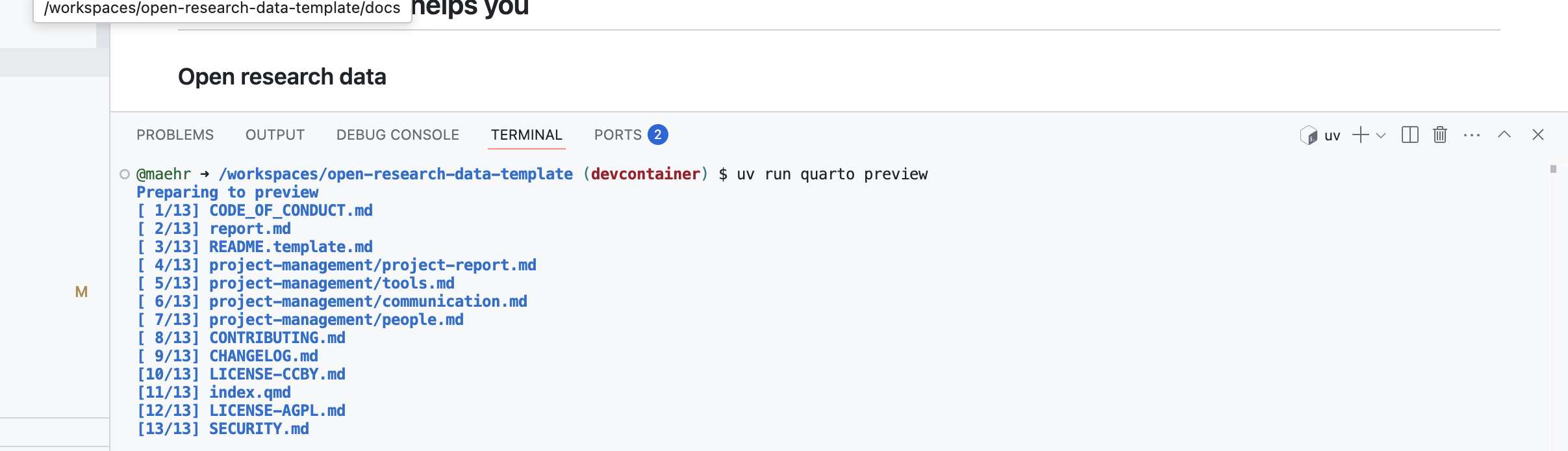
Note: All dependencies (Node.js, Python, R, Quarto) are pre-installed in the Codespace.
👩💻 Advanced Local Installation
Prerequisites
- Node.js
- R and Rtools (on Windows)
- uv (Python manager)
- Quarto
Note:
uvinstalls and manages the correct Python version automatically.
Local Setup Steps
# 1. Install Node.js dependencies
npm install
npm run prepare

# 2. Setup Python environment
uv sync

# 3. Setup R environment
Rscript -e 'install.packages("renv"); renv::restore()'

# 4. Preview documentation
uv run quarto preview
Use
Building the Abstract
To build the LaTeX abstract:
cd abstract
make paper
Development Commands
Check that all files are properly formatted:
npm run checkFormat all files:
npm run formatRun the wizard to write meaningful commit messages:
npm run commitGenerate a changelog:
npm run changelogAlt-Text Generation Pipeline
The repository includes a focused Python pipeline for generating WCAG-compliant alternative texts using OpenRouter-compatible vision-language models. The pipeline supports systematic evaluation of VLM performance on alt-text generation tasks for digital heritage collections.
Features
- Automated alt-text generation using multiple VLM models in parallel
- WCAG 2.2 compliance with structured prompts based on accessibility guidelines
- Metadata integration from remote sources with provenance tracking
- Wide-format output with model responses in CSV, JSONL, and Parquet formats
- Raw API response storage for reproducibility and analysis
- Interactive playground via Jupyter notebook for experimentation
Quick Start
- Install Python dependencies with uv:
uv sync- Set up your OpenRouter API key in a
.envfile:
cp example.env .env
# Edit .env to add your OPENROUTER_API_KEY- Run the alt-text generation pipeline:
uv run python src/generate_alt_text.pyThis will:
- Fetch metadata from the configured URL
- Generate alt-text for specified media IDs using all configured models
- Save results in
runs/YYYYmmdd_HHMMSS/including:metadata.json: Copy of fetched metadata for provenancealt_text_runs_*.csv: Wide-format table with all model responsesalt_text_runs_*.jsonl: Same data in JSONL formatalt_text_runs_*.parquet: Same data in Parquet format (if available)raw/*.json: Individual raw API responses from each modelmanifest.json: Run metadata including configuration and file paths
- Experiment interactively with the Jupyter notebook:
uv run jupyter notebook src/playground.ipynbSurvey workflow
- Generate or refresh
survey/questions.csvfrom the latest run outputs and publish it in the Formspree survey. - Invite human experts to complete the ranking survey—model comparison only works with real judgments.
- After submissions close, run the survey analysis scripts in sequence:
# Clean and anonymise raw Formspree export
uv run python src/clean_survey_data.py

# Expand per-object rankings for each rater
uv run python src/process_survey_rankings.py

# Aggregate consensus winners and example texts
uv run python src/process_best_answers.py

# Summarise completion times for quality checks
uv run python src/analyze_survey_time.py

# Required: statistical tests, tables, and plots
uv run python src/ranking_tests.py
All scripts write to data/processed/ and analysis/.
Configuration
Edit src/generate_alt_text.py to customize:
MODELS: List of OpenRouter model identifiers to useMEDIA_IDS: List of media object IDs to processMETADATA_URL: URL to fetch media metadata JSON
Current models configured in generate_alt_text.py:
google/gemini-2.5-flash-liteqwen/qwen3-vl-8b-instructopenai/gpt-4o-minimeta-llama/llama-4-maverick
Script workflow and artefacts
Outputs by directory
runs/<timestamp>/—generate_alt_text.pywritesmanifest.json,raw/*.json(per model × object), cachedimages/*.jpg, and timestamped tables (alt_text_runs_*_{wide,long}.csv|parquet|jsonl, optional prompts CSV).data/raw/— manual Formspree exports (e.g.,formspree_*_export.json).data/processed/—clean_survey_data.py,process_survey_rankings.py, andprocess_best_answers.pymaterialiseprocessed_survey_submissions.json,survey_rankings.csv, andbest_answers.csv.analysis/—analyze_survey_time.pyandranking_tests.pyproducetime_stats_by_{object,submission}.csv,rank_counts_*.csv, statistical summaries, and comparison plots (rank_distributions_boxplot.png,pairwise_pvalues_heatmap.png, etc.).paper/images/—viz_dataset.pyrenders figure assets such asfig_type_era_full.pngandfig_type_era_subset.png.
Each script prints the paths it writes; check those logs for exact filenames when running new experiments.
Reference run (2025-10-21 subsample)
Use runs/20251021_233530/ as the canonical example of a recent full pipeline execution.
- Configuration:
mode="subsample"across 20 media IDs and four models (google/gemini-2.5-flash-lite,qwen/qwen3-vl-8b-instruct,openai/gpt-4o-mini,meta-llama/llama-4-maverick). - Runtime: 244 seconds wall time; no errors recorded in
run.log. - Artefacts:
alt_text_runs_20251021_233933_wide.{csv,parquet}— pivoted responses (one row per media object with model-specific columns).alt_text_runs_20251021_233933_long.{csv,parquet,jsonl}— long format table with 80 model/object rows.alt_text_runs_20251021_233933_prompts.csv— per-item prompt, system, and image URL trace.raw/*.json— individual API responses (model×object).images/*.jpg— thumbnails cached during the run.manifest.json— reproducibility metadata (models, media IDs, durations, output pointers).
Mirror this structure when staging new runs for survey generation or reporting.
Support
This project is maintained by @maehr. Please understand that we can’t provide individual support via email. We also believe that help is much more valuable when it’s shared publicly, so more people can benefit from it.
| Type | Platforms |
|---|---|
| 🚨 Bug Reports | GitHub Issue Tracker |
| 📚 Docs Issue | GitHub Issue Tracker |
| 🎁 Feature Requests | GitHub Issue Tracker |
| 🛡 Report a security vulnerability | See SECURITY.md |
| 💬 General Questions | GitHub Discussions |
Roadmap
Contributing
Please see CONTRIBUTING.md for details on our code of conduct and the process for submitting pull requests.
License
The abstract, presentation materials, and documentation in this repository are released under the Creative Commons Attribution 4.0 International (CC BY 4.0) License - see the LICENSE-CCBY file for details. By using these materials, you agree to give appropriate credit to the original author(s) and to indicate if any modifications have been made.
Any code in this repository is released under the GNU Affero General Public License v3.0 - see the LICENSE-AGPL file for details.