X1 Create the repository
09:15–09:40 · 25 minutes
- Time: 25 minutes
- You produce: a repository from the template, a README for the fictional thesis with a synthetic-data notice, and a checked visibility setting.
- New terms: repository, template, README, Markdown, commit, visibility, GitHub Actions workflow. All terms are in the cheat sheet.
Why this step
A thesis needs one place where the plan, the data, the documentation, and the decisions live together. A repository is that place: it stores files and their full history. The template gives the repository a structure for data, documentation, and project management, so that you do not invent folders under time pressure.
The template is a starting point, not a finished product. Its README describes the template itself, and its citation file names the template authors. You must make the repository describe your thesis. In this workshop, the thesis is fictional and the data are synthetic. That is why the exercise repository can be public. A real thesis repository starts private (see Transfer to a private thesis).
Before you start
- You are signed in to GitHub. See Setup.
- You use a desktop browser. A phone screen hides parts of the interface.
- Command-line route: you installed git and gh and signed in. See Prepare the command line.
Steps
Create the repository from the template
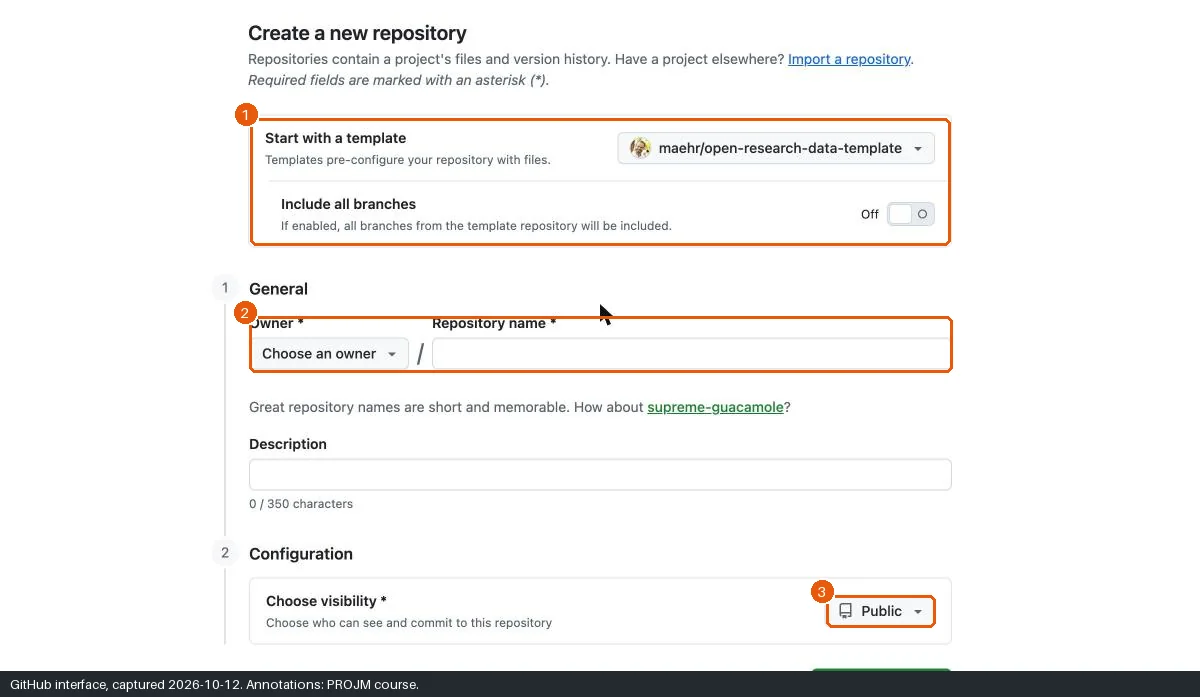
- Open the template link.
- Make sure that Start with a template shows
maehr/open-research-data-template. - Leave Include all branches off.
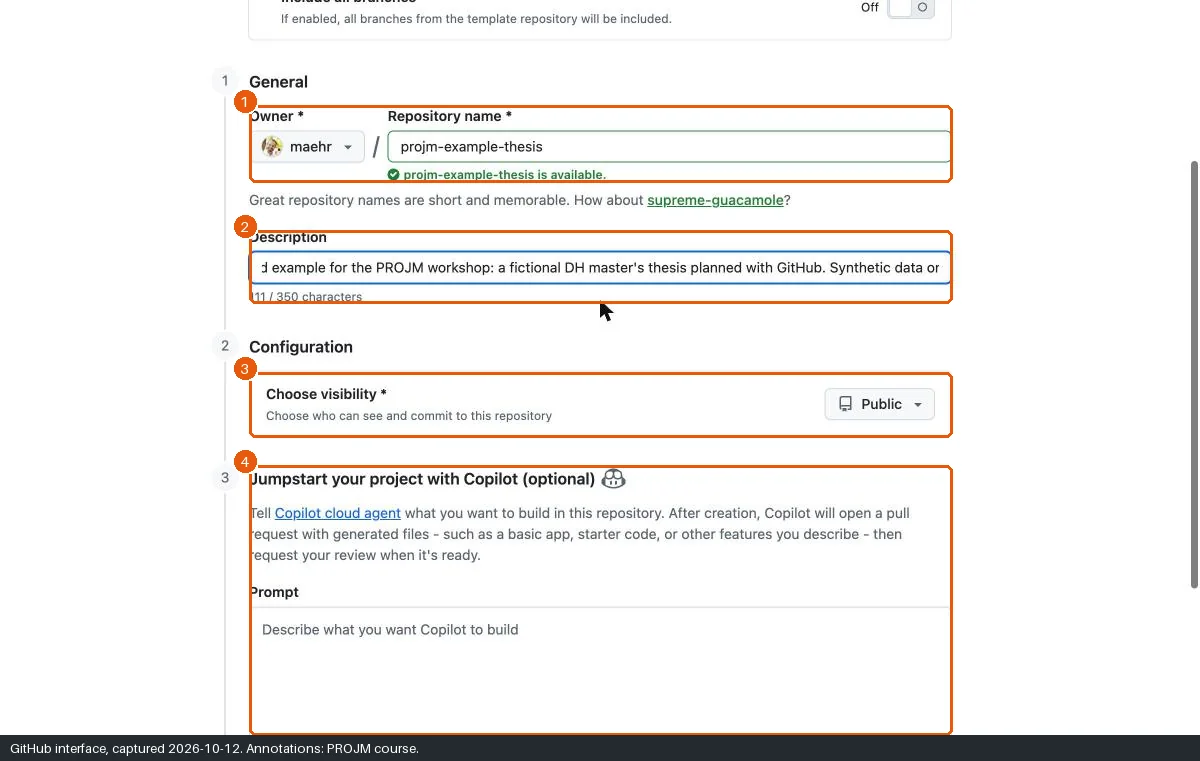
- In Owner, select your account.
- In Repository name, type
projm-thesis. - In Description, type
Workshop example: fictional DH master's thesis. Synthetic data only. - In Choose visibility, keep Public. If you work on the private path, select Private.
- Leave the section Jumpstart your project with Copilot (optional) empty.
- Click Create repository. Wait until “Generating your repository…” disappears.
Open a terminal in the folder where you keep your projects.
Create the repository from the template and copy it to your computer. On the private path, type
--privateinstead of--public.gh repo create projm-thesis --template maehr/open-research-data-template --public --clone \ --description "Workshop example: fictional DH master's thesis. Synthetic data only."Go into the new folder. All later commands run in this folder.
cd projm-thesis
Replace the README
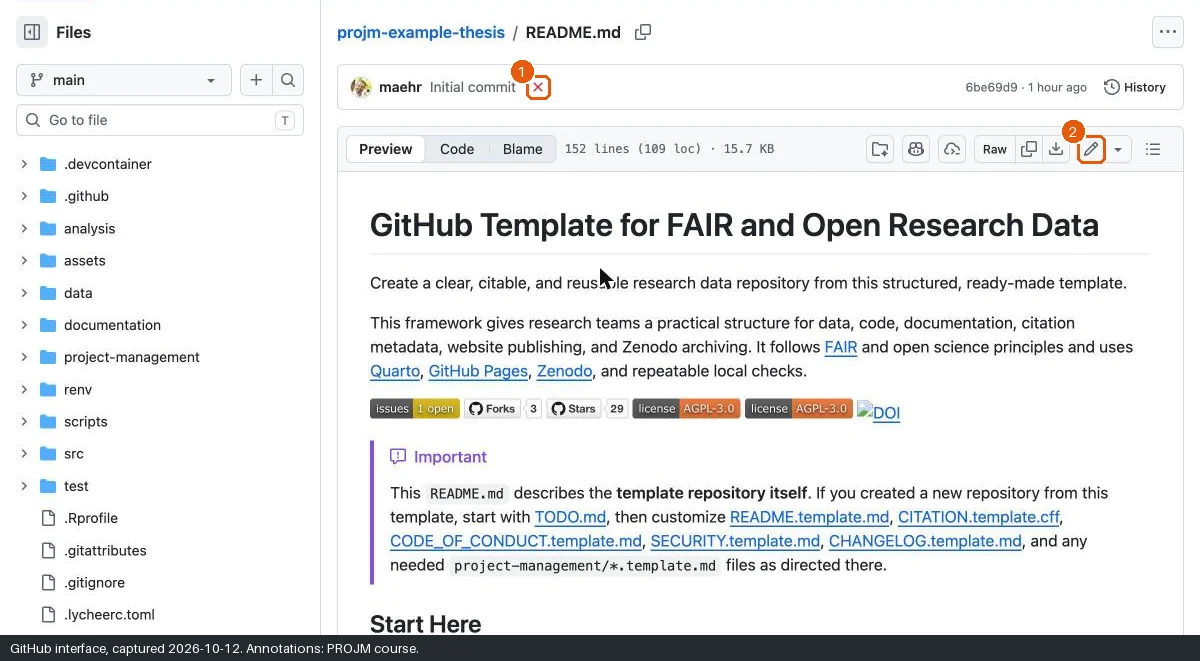
- Open
README.mdin your new repository. - Click the pencil icon (Edit this file).
- Select all text in the editor and delete it.
- Paste the text below.
- Click Commit changes….
- Read the commit message. If Copilot filled it in, replace the message with
docs: describe the fictional thesis and the synthetic data. - Delete or correct the extended description if it describes changes that you did not make.
- Keep Commit directly to the
mainbranch. - Click Commit changes.
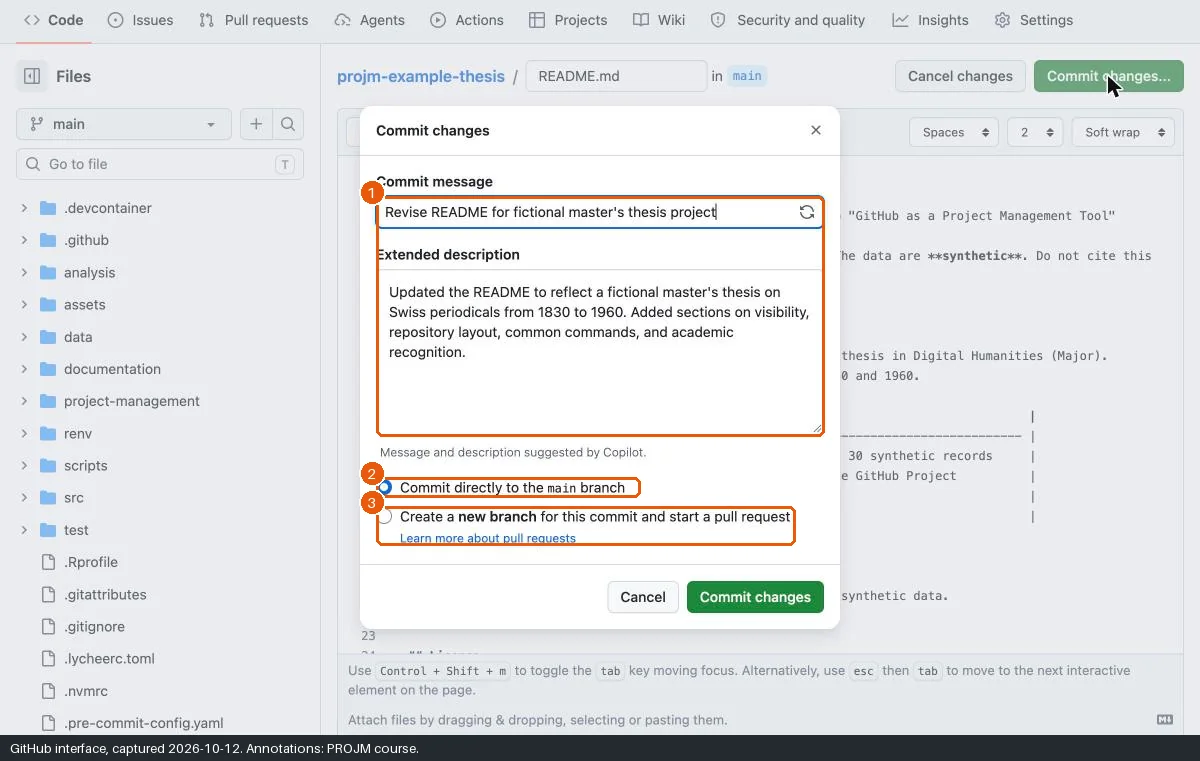
During the test run on 12 October 2026, Copilot suggested a description that claimed sections the change did not contain. A commit message is part of your project record. Write it yourself or check it line by line.
Open
README.mdin a text editor.Delete all text.
Paste the text below.
Save the file.
Save the change as a commit and send it to GitHub:
git add README.md
git commit -m "docs: describe the fictional thesis and the synthetic data"
git push
The text for README.md:
# Fictional master's thesis: Swiss periodicals, 1830–1960

> [!WARNING]
> This repository is a **teaching example** for the workshop "GitHub as a Project Management Tool" (University of Bern, HS2026).
> The thesis, the people, and the dates are **fictional**. The data are **synthetic**. Do not cite this repository as research.

## About

This repository plans, documents, and shares a fictional MA thesis in Digital Humanities (Major).
The thesis asks how the landscape of Swiss periodicals changed between 1830 and 1960 by language, place, and subject.

| Item                   | Value                                                  |
| ---------------------- | ------------------------------------------------------ |
| Data                   | `data/clean/synthetic-periodicals.csv`, 30 synthetic records |
| Plan                   | GitHub Issues, milestones, and one GitHub Project      |
| Fictional registration | 2026-12-01                                             |
| Fictional submission   | 2027-06-01                                             |

## Visibility

This exercise repository is public because it contains only synthetic data.
A real thesis repository starts **private**.

## Licence

Text and data: CC BY 4.0. Code: AGPL 3.0.
Check the visibility
- Click Settings in the repository tabs.
- Scroll to Danger Zone.
- Read the line under Change repository visibility. It must say “public” for the public path or “private” for the private path.
- Do not change the visibility now.
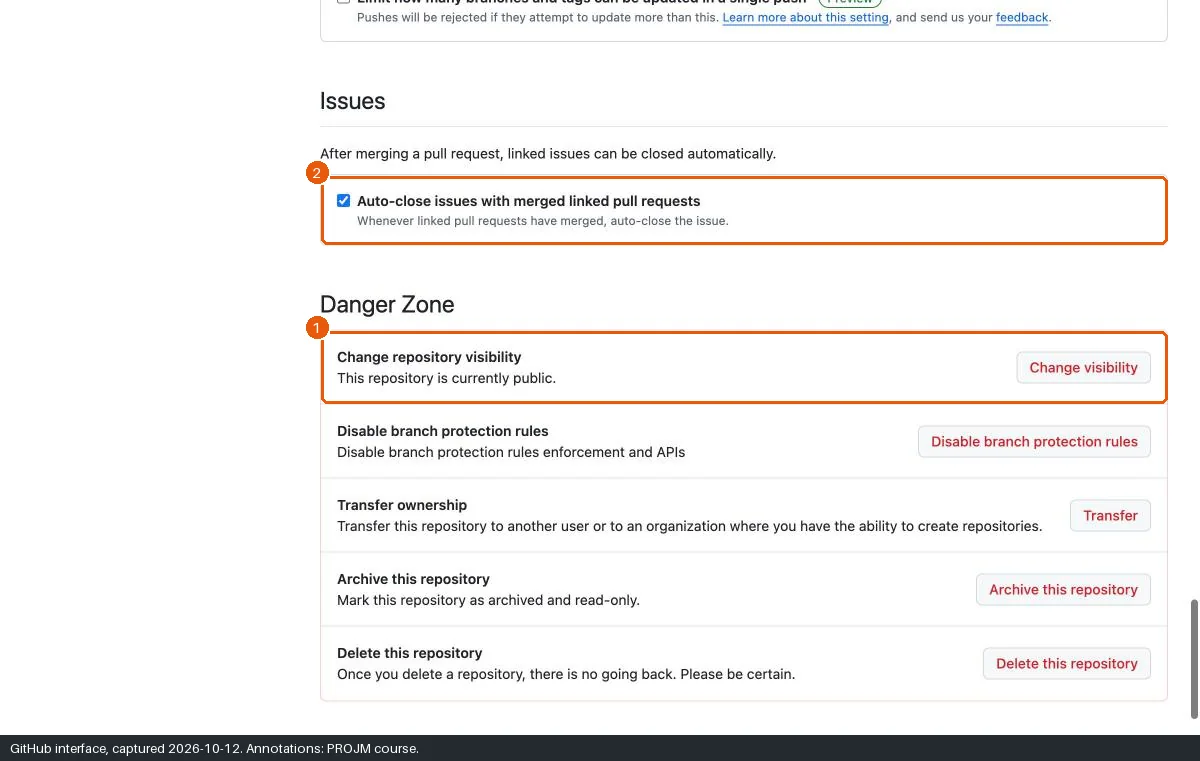
Show the visibility of the repository. The result must be
PUBLICfor the public path orPRIVATEfor the private path.gh repo view --json visibility --jq .visibilityDo not change the visibility now.
Stop the template workflows (optional)
The template contains automated workflows. They run once when GitHub creates your repository and fail, because the website publishing is not set up. You can ignore the red cross. To stop further runs and e-mails, disable them.
- Click Settings.
- In the left menu, click Actions and then General.
- Under Actions permissions, select Disable actions.
- Click Save.
Disable Actions for the repository. Type
{owner}and{repo}as shown: gh fills in the values of the repository in the current folder.gh api -X PUT repos/{owner}/{repo}/actions/permissions -F enabled=falseCheck the setting. The result must be
false. The change can take a few seconds to show.gh api repos/{owner}/{repo}/actions/permissions --jq .enabled
Expected state
If something goes wrong
| Problem | Cause | Recovery |
|---|---|---|
| The name is not available. | You already have a repository with this name. | Add a suffix, for example projm-thesis-2. |
| The template field is empty. | The link did not carry the template. | Open the template repository and click Use this template, then Create a new repository. |
| A red cross shows next to “Initial commit”. | The template workflows failed. | This is expected. Disable Actions (see above) or ignore it. |
| You receive e-mails about failed runs. | The workflows ran. | Disable Actions. |
| You committed the wrong text. | — | Edit the file again. The history keeps both versions. |
| You do not have an account yet. | — | Work with a neighbour on one screen, or follow the example repository. |
| A command fails. | Usually the installation, the sign-in, or the folder. | See Command-line problems, or do the step in the browser. |
Alternatives
- Pair: one person creates the repository and adds the other as a collaborator (Settings → Collaborators → Add people). Both work in the same repository.
- Private path: select Private in step 7, or type
--privateon the command line. Every later exercise works the same way. A private repository on GitHub Free cannot publish a GitHub Pages site; this workshop does not need one.