X4 Complete one documentation task
11:05–11:40 · 35 minutes
- Time: 35 minutes
- You produce: one merged pull request that adds the section “Research question and scope” to the README and closes the Issue E01-T2.
- New terms: branch, commit, pull request, review, merge. All terms are in the cheat sheet.
Why this step
In X1 you changed main directly. That is acceptable for a first README, but it skips two safeguards. A branch keeps a change apart until it is ready. A pull request shows the change, links it to the Issue that asked for it, and invites a review before the change enters main.
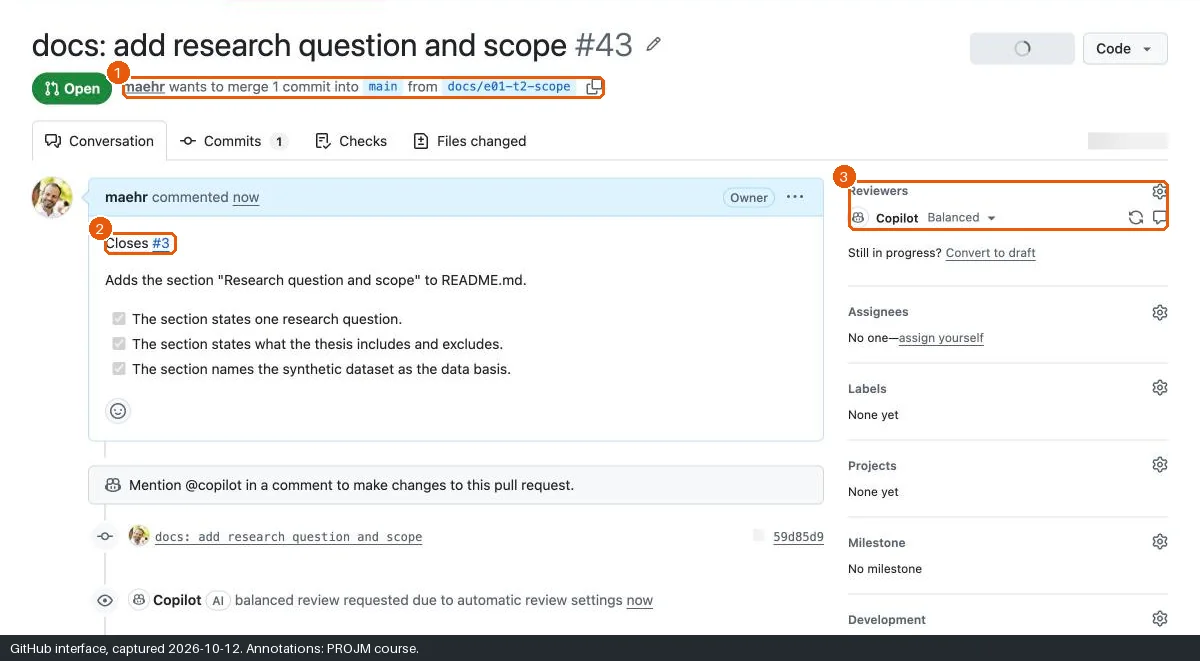
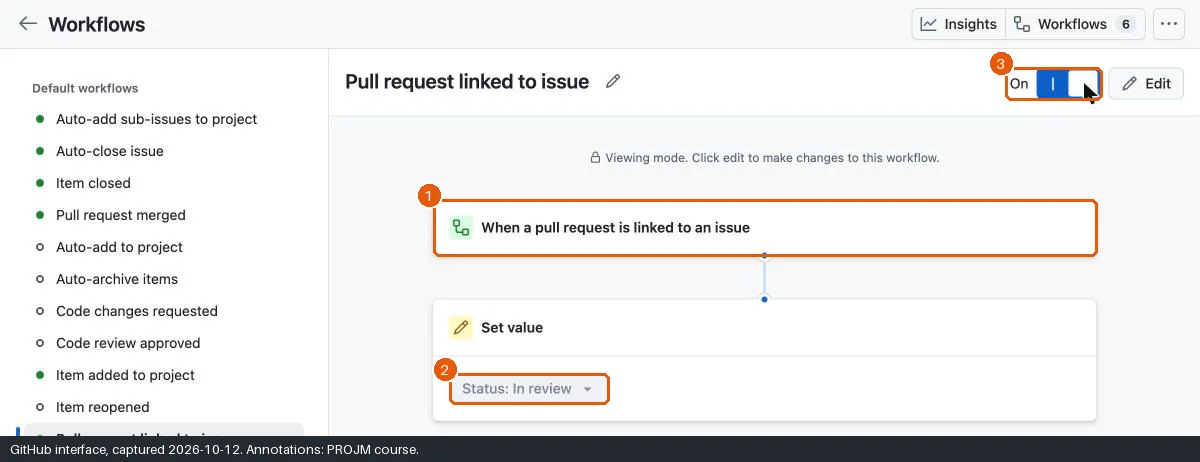
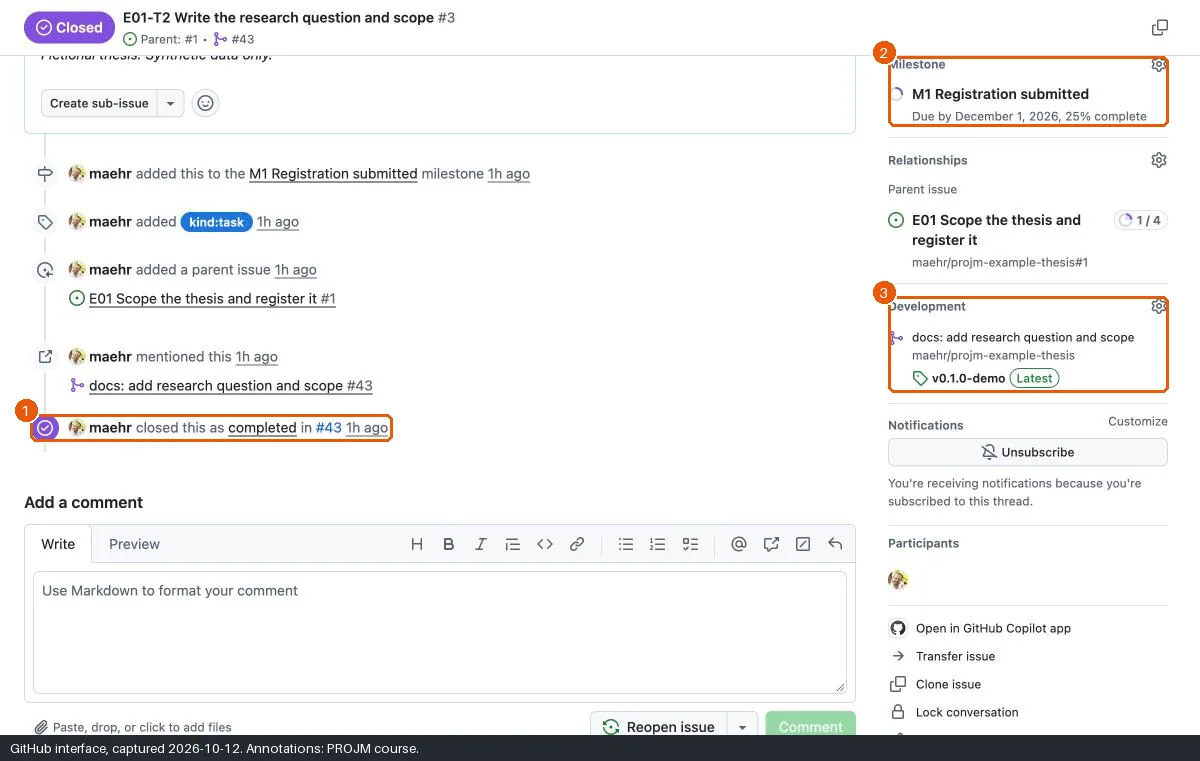
The link between the pull request and the Issue closes the loop of the plan. The keyword Closes #4 in the pull request description tells GitHub to close Issue #4 when the pull request merges. The Project workflows then move the item to In review when the link appears and to Done when the Issue closes. The plan and the work agree without extra clicks.
A review is a human check against the acceptance criteria. An automatic AI reviewer can appear if your account enables it. In the test run on 12 October 2026, it failed with a quota message. Do not treat an AI review as the review.
Before you start
You finished X3. Issue E01-T2 exists. Note its number (for example
#4).Command-line route: open a terminal in the folder
projm-thesis. Define the helperissueas in X3, if this is a new terminal:issue() { gh issue list --state all --limit 100 --json number,title \ --jq ".[] | select(.title | startswith(\"$1 \")) | .number"; }Pair up if possible. Your partner reviews your pull request, and you review theirs.
Steps
Edit on a new branch
- Open
README.mdand click the pencil icon. - Place the cursor before the line
## Visibility. - Paste the text below.
- Click Commit changes….
- Type the message
docs: add research question and scope. - Select Create a new branch for this commit and start a pull request. Keep the proposed branch name or type
docs/e01-t2-scope. - Click Propose changes.
Create a branch for E01-T2 and switch to it. The branch is linked to the Issue.
gh issue develop $(issue E01-T2) --name docs/e01-t2-scope --checkoutOpen
README.mdin a text editor.Paste the text below before the line
## Visibility.Save the file.
Save the change as a commit and send the branch to GitHub:
git add README.md
git commit -m "docs: add research question and scope"
git push
The text to paste:
## Research question and scope

**Research question:** How did the landscape of Swiss periodicals change between 1830 and 1960 by language, place, and subject?

| In scope                                                  | Out of scope                                   |
| --------------------------------------------------------- | ---------------------------------------------- |
| 30 synthetic periodical records (German, French, Italian) | Real archival records or digitised page images |
| Place, language, frequency, and years of publication      | Content analysis of articles                   |
| Reuse status of the fictional scans                       | Readers, subscribers, or other personal data   |
Open the pull request
- Type the title
docs: add research question and scope. - In the description, write
Closes #4on the first line. Use the number of your E01-T2. - Copy the acceptance criteria of E01-T2 below it and tick the boxes that your change meets.
- Click Create pull request.
- Open your Project. E01-T2 now shows the Status In review. The Project workflow Pull request linked to issue sets it. The workflow runs with a delay. If the Status did not change, wait one minute and reload the page. If it still did not change, check the workflow as in X3.
Print the number of your E01-T2 with
issue E01-T2.In a text editor, write the description of the pull request. Write
Closes #and this number on the first line, for exampleCloses #4.Copy the acceptance criteria of E01-T2 below it. Tick the boxes that your change meets:
- [x].Save the description as
pr-body.mdin the folder that containsprojm-thesis.Open the pull request:
gh pr create --title "docs: add research question and scope" --body-file ../pr-body.mdCheck the Status of E01-T2 in the Project. The result is
In review. The Project workflow Pull request linked to issue sets it.gh issue view $(issue E01-T2) --json projectItems --jq '.projectItems[] | .title + ": " + .status.name'The workflow runs with a delay. If the result is not
In review, wait one minute and run the command again.
Review and merge
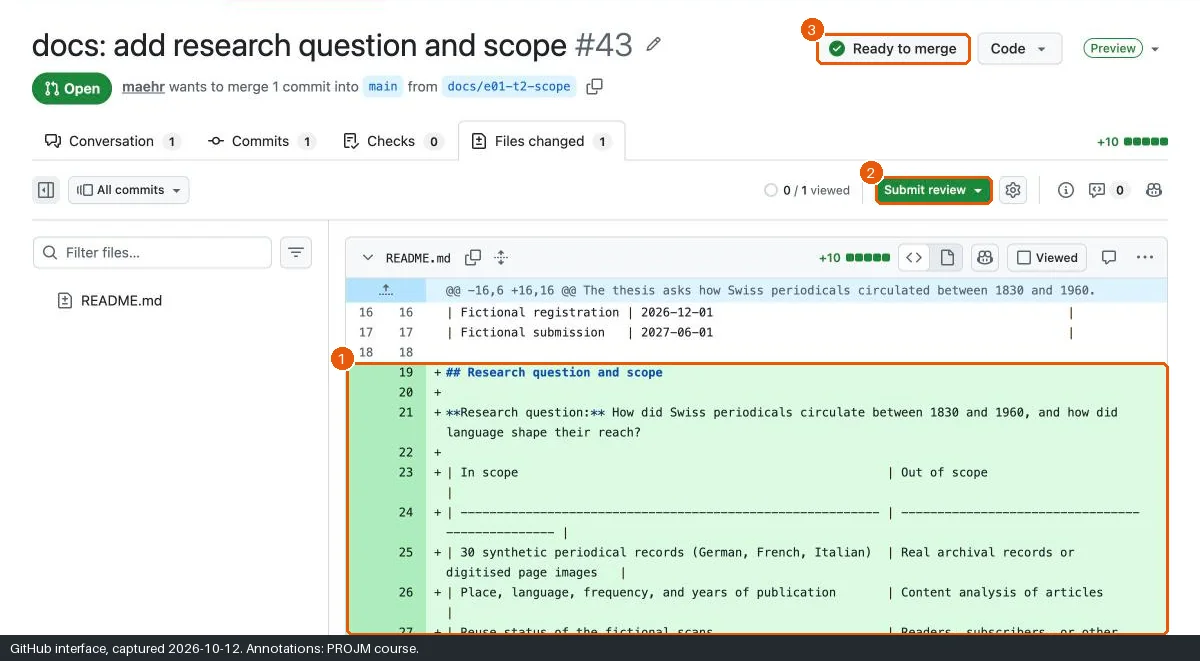
- Open the tab Files changed.
- Check the change against each acceptance criterion.
- Click Submit review. A partner selects Approve; on your own pull request, select Comment and write what you checked.
- Return to Conversation and click Merge pull request, then Confirm merge.
- Click Delete branch.
- Open your Project. E01-T2 shows the Status Done. The workflow runs with a delay. If the Status did not change, wait one minute and reload the page.
Show the change and check it against each acceptance criterion:
gh pr diffSubmit the review. On your own pull request, write a comment that says what you checked. A partner approves with
gh pr review NUMBER --approve.gh pr review --comment --body "Checked the three acceptance criteria."Merge the pull request and delete the branch. gh then switches your folder back to
mainand gets the merged state.gh pr merge --merge --delete-branchCheck that E01-T2 is closed and that the Project shows
Done:gh issue view $(issue E01-T2) --json state,projectItems --jq '.state, (.projectItems[] | .status.name)'The workflow runs with a delay. If the result is not
CLOSEDandDone, wait one minute and run the command again.
Expected state
If something goes wrong
| Problem | Cause | Recovery |
|---|---|---|
| The Issue did not close. | The keyword is missing or has the wrong number. | Edit the pull request description before the merge. After the merge, close the Issue by hand and link the pull request. |
| You cannot approve your own pull request. | GitHub does not allow it. | Use Comment, or ask a partner. |
| The Status did not change. | The Project workflow is off or broken. | Open Workflows; check Pull request linked to issue and Item closed. Set the Status by hand. |
| “This branch has conflicts”. | Someone else changed the same lines. | Click Resolve conflicts, keep both texts, and mark the conflict as resolved. |
You committed to main instead. |
Wrong option in the dialog, or no git switch before the commit. |
Close the Issue by hand with a comment that links the commit. Use a branch next time. |
| A command fails. | Usually the installation, the sign-in, or the folder. | See Command-line problems, or do the step in the browser. |
Alternatives
- Pair: exchange review rights. Add your partner as a collaborator so that they can approve.
- Private path: identical. Branch protection for private repositories needs a paid plan, but this exercise does not need it.
Official documentation
Next
Break (11:40–11:50), then X5 Prepare a reusable output.