X2 Turn requirements into work
09:40–10:15 · 35 minutes
- Time: 35 minutes
- You produce: three labels, two epics (E01, E08), six sub-issues with acceptance criteria, and one user story. You write one sub-issue yourself from a requirement. Each rule-based Issue names its source.
- New terms: issue, label, epic, sub-issue. All terms are in the cheat sheet.
Why this step
A thesis plan fails when it lists only intentions such as “write chapter 2”. Work becomes manageable when each item names an output, an owner, acceptance criteria, and the evidence that shows completion. An Issue holds exactly these parts.
Two kinds of structure help. An epic groups the work for one substantial outcome, for example “Scope the thesis and register it”. A sub-issue is one piece of that work with one output. GitHub links them natively: the epic shows the progress of its sub-issues. A user story states a need from the perspective of a person who will use the output: “As … I need … so that …”. It reminds you that documentation has a reader.
Some work exists because a regulation requires it; other work is good practice. Mark the difference. A Rule Issue names its source, the article, and whether you verified it. Rules of this course (KSL) do not govern your thesis. The requirements register separates the two.
Before you start
- You have the repository from X1.
- Find the titles and the bodies to copy in Texts to copy at the end of this page.
- Open the requirements register in a third tab. You derive one Issue from it yourself.
- Command-line route: open a terminal in the folder
projm-thesis.
Steps
Create the labels
- Click Issues, then Labels.
- Click New label.
- Type the name
kind:epic, the descriptionParent Issue for a substantial outcome, and click Create label. - Repeat for
kind:task(Sub-issue with one output) andkind:story(Sub-issue written as a user story).
Create the three labels:
gh label create kind:epic --description "Parent Issue for a substantial outcome"
gh label create kind:task --description "Sub-issue with one output"
gh label create kind:story --description "Sub-issue written as a user story"
Check that the three labels exist:
gh label list --search kind
GitHub Issue Types exist only for organisations. Labels work in every personal account.
Create the two epics
- Click Issues, then New issue.
- Type the title
E01 Scope the thesis and register it. - Paste the body of E01.
- On the right, click Labels and select
kind:epic. - Click Create.
- Repeat for
E08 Publish and preserve the outputs.
Each command reads the body of one Issue in the example repository and creates your Issue with this body. The bodies are the same as in Texts to copy.
Create the epic E01:
gh issue view 1 -R maehr/projm-example-thesis --json body --jq .body \
  | gh issue create --title "E01 Scope the thesis and register it" --label kind:epic --body-file -
Create the epic E08:
gh issue view 37 -R maehr/projm-example-thesis --json body --jq .body \
  | gh issue create --title "E08 Publish and preserve the outputs" --label kind:epic --body-file -
gh prints the address of each new Issue. The number at the end is the Issue number. In a new repository, E01 is #1 and E08 is #2. The commands below use these numbers. If your numbers differ, use your numbers.
Derive one sub-issue yourself
Do not copy this one. Write it from the requirement, because that is what you will do for your real thesis.
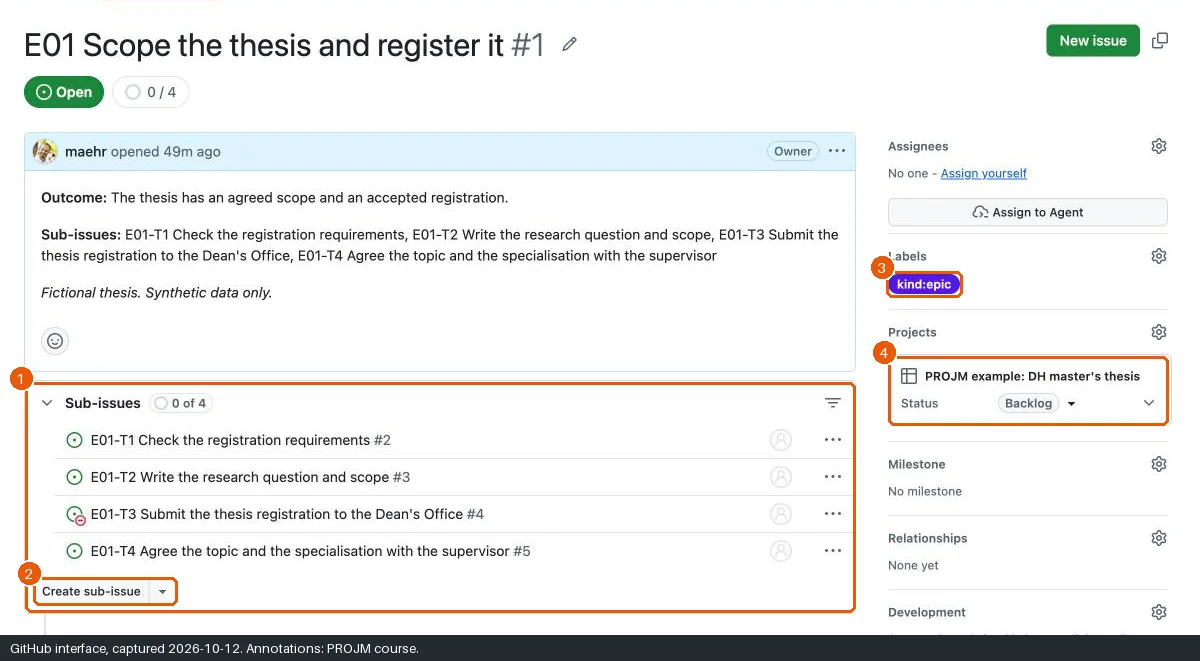
- Open the epic E01. Below the description, click Create sub-issue. The button appears when the page has loaded.
- Type the title
E01-T1 Check the registration requirements. - Read requirement R-05 in the requirements register and the sentence on page 5 of the study plan (Art. 15 Abs. 5).
- Write the body in your own words. Use the five parts below.
- Add the label
kind:taskand click Create. - Compare your Issue with E01-T1 in the example repository. Add what you missed.
Read requirement R-05 in the requirements register and the sentence on page 5 of the study plan (Art. 15 Abs. 5).
In a text editor, write the body in your own words. Use the five parts below.
Save the body as
e01-t1.mdin the folder that containsprojm-thesis. Outside the repository, you cannot commit the file by mistake.Create the sub-issue of E01 with this body:
gh issue create --title "E01-T1 Check the registration requirements" --label kind:task \
  --parent 1 --body-file ../e01-t1.md
Compare your Issue with E01-T1 in the example repository:
gh issue view 2 -R maehr/projm-example-thesisAdd what you missed to
e01-t1.md. Then replace the body of your Issue. Use the number of your E01-T1:gh issue edit 3 --body-file ../e01-t1.md
**Output:** <what exists when the task is done?>
**Owner:** <who does it?>
**Basis:** Rule: <document, article, page> (<verified or unconfirmed>)

**Acceptance criteria**

- [ ] <a check that someone else can confirm>

**Evidence:** <what proves it, and where is it stored?>
Create the other five sub-issues
- In E01, click Create sub-issue again. Create
E01-T2andE01-T3with the labelkind:task. Copy the titles and the bodies from Texts to copy. - Open the epic E08. Create
E08-S1with the labelkind:story, thenE08-T2andE08-T3withkind:task.
If you created an Issue on its own, open the epic, click the arrow next to Create sub-issue, and select Add existing issue.
Create the sub-issues E01-T2 and E01-T3 of E01 (
--parent 1):gh issue view 3 -R maehr/projm-example-thesis --json body --jq .body \ | gh issue create --title "E01-T2 Write the research question and scope" --label kind:task --parent 1 --body-file - gh issue view 4 -R maehr/projm-example-thesis --json body --jq .body \ | gh issue create --title "E01-T3 Submit the thesis registration to the Dean's Office" --label kind:task --parent 1 --body-file -Create the sub-issues E08-S1, E08-T2, and E08-T3 of E08 (
--parent 2):gh issue view 38 -R maehr/projm-example-thesis --json body --jq .body \ | gh issue create --title "E08-S1 Document the dataset for a future reuser" --label kind:story --parent 2 --body-file - gh issue view 39 -R maehr/projm-example-thesis --json body --jq .body \ | gh issue create --title "E08-T2 Decide on rights and access for data and text" --label kind:task --parent 2 --body-file - gh issue view 40 -R maehr/projm-example-thesis --json body --jq .body \ | gh issue create --title "E08-T3 Publish a demo release of the documented dataset" --label kind:task --parent 2 --body-file -Check the epics. The line
sub-issueslists three Issues for each epic:gh issue view 1 gh issue view 2
If you created an Issue without --parent, add it to its epic afterwards. For example, gh issue edit 1 --add-sub-issue 9 makes Issue 9 a sub-issue of E01.
Check one rule and one story
- Open
E01-T3. Read the line Basis. Its status is unconfirmed: the regulation refers to dates that the Dean’s Office publishes. Explain why the Issue does not invent a date. - Open
E08-S1. Read the story. Name the person who needs the output.
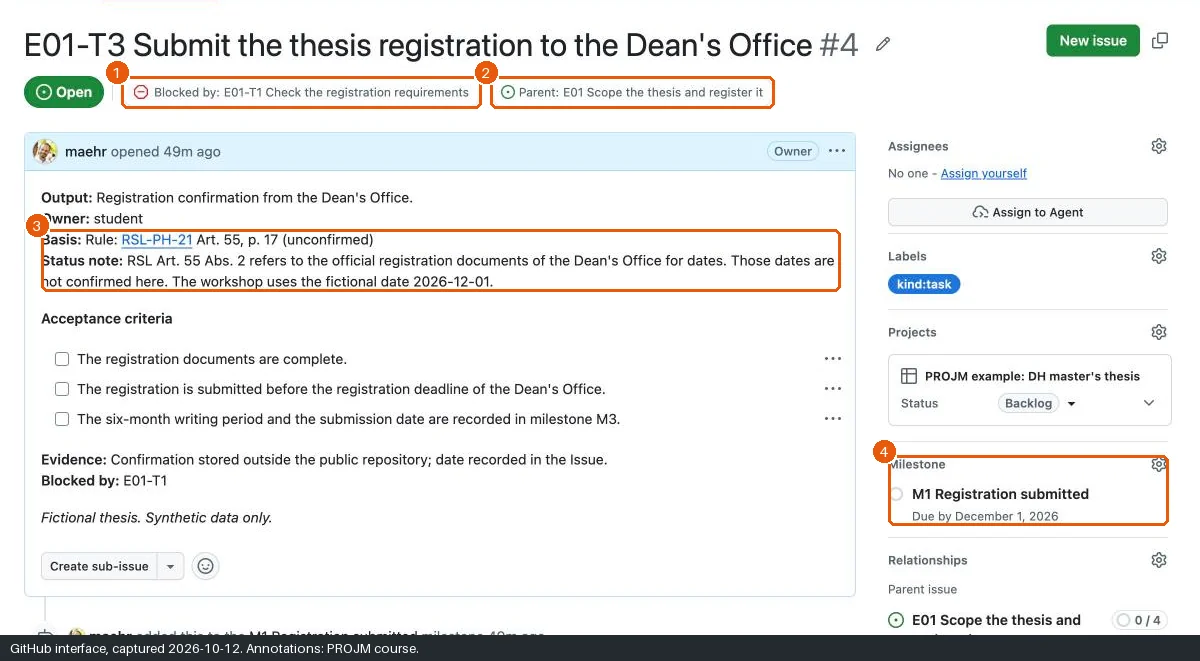
Show E01-T3. Read the line Basis. Its status is unconfirmed: the regulation refers to dates that the Dean’s Office publishes. Explain why the Issue does not invent a date.
gh issue view 5Show E08-S1. Read the story. Name the person who needs the output.
gh issue view 6
Texts to copy
Each text gives the title, the label, and the body of one Issue. The same Issues are in the example repository. E01-T1 is missing on purpose: you write it yourself.
E01
Title: E01 Scope the thesis and register it · Label: kind:epic
**Outcome:** The thesis has an agreed scope and an accepted registration.

**Sub-issues:** E01-T1 Check the registration requirements, E01-T2 Write the research question and scope, E01-T3 Submit the thesis registration to the Dean's Office, E01-T4 Agree the topic and the specialisation with the supervisor

_Fictional thesis. Synthetic data only._
E01-T2
Title: E01-T2 Write the research question and scope · Label: kind:task
**Output:** Section "Research question and scope" in README.md.
**Owner:** student
**Basis:** Practice

**Acceptance criteria**

- [ ] The section states one research question.
- [ ] The section states what the thesis includes and excludes.
- [ ] The section names the synthetic dataset as the data basis.

**Evidence:** Merged pull request that closes this Issue.

_Fictional thesis. Synthetic data only._
E01-T3
Title: E01-T3 Submit the thesis registration to the Dean's Office · Label: kind:task
**Output:** Registration confirmation from the Dean's Office.
**Owner:** student
**Basis:** Rule: [RSL-PH-21](https://www.unibe.ch/e152701/e154048/e191232/e205334/e227828/phil_hist_rsl_final_ger.pdf) Art. 55, p. 17 (unconfirmed)
**Status note:** RSL Art. 55 Abs. 2 refers to the official registration documents of the Dean's Office for dates. Those dates are not confirmed here. The workshop uses the fictional date 2026-12-01.

**Acceptance criteria**

- [ ] The registration documents are complete.
- [ ] The registration is submitted before the registration deadline of the Dean's Office.
- [ ] The six-month writing period and the submission date are recorded in milestone M3.

**Evidence:** Confirmation stored outside the public repository; date recorded in the Issue.
**Blocked by:** E01-T1

_Fictional thesis. Synthetic data only._
E08
Title: E08 Publish and preserve the outputs · Label: kind:epic
**Outcome:** Reusable outputs are documented, released, and preserved within the rights that apply.

**Sub-issues:** E08-S1 Document the dataset for a future reuser, E08-T2 Decide on rights and access for data and text, E08-T3 Publish a demo release of the documented dataset, E08-T4 Decide on library access to the submitted thesis, E08-T5 Deposit the final dataset in a repository with a persistent identifier

_Fictional thesis. Synthetic data only._
E08-S1
Title: E08-S1 Document the dataset for a future reuser · Label: kind:story
> As a future reuser, I need the columns, types, missing values, synthetic origin, version, and licence of the CSV documented, so that I can reuse the data without asking the author.

**Output:** documentation/data-dictionary.qmd
**Owner:** student
**Basis:** Practice

**Acceptance criteria**

- [ ] Every CSV column has a name, a type, a description, and its allowed values.
- [ ] The page explains how missing values appear.
- [ ] The page states that every record is synthetic.
- [ ] The page states the dataset version and the licence.

**Evidence:** Data dictionary page linked in the Issue.

_Fictional thesis. Synthetic data only._
E08-T2
Title: E08-T2 Decide on rights and access for data and text · Label: kind:task
**Output:** Decision record on what is public, what is private, and under which licence.
**Owner:** student
**Basis:** Practice

**Acceptance criteria**

- [ ] The record lists each output with its access level and its licence.
- [ ] The record names the rights of third parties, for example archive restrictions on scans.
- [ ] The record states who decides on library access to the thesis.

**Evidence:** Entry in project-management/decisions.md.

_Fictional thesis. Synthetic data only._
E08-T3
Title: E08-T3 Publish a demo release of the documented dataset · Label: kind:task
**Output:** GitHub release v0.1.0-demo with release notes.
**Owner:** student
**Basis:** Demo

**Acceptance criteria**

- [ ] The release notes say that the data are synthetic and that the release is a demo.
- [ ] The release contains only material that E08-T2 allows.
- [ ] The release notes state that a GitHub release is not long-term preservation.

**Evidence:** Link to the release.
**Blocked by:** E08-T2

_Fictional thesis. Synthetic data only._
Expected state
If something goes wrong
| Problem | Cause | Recovery |
|---|---|---|
| Create sub-issue is missing. | The page shows a pull request, or an old layout. | Reload the Issue page. Use Add existing issue from the arrow next to the button. |
| A sub-issue is under the wrong epic. | — | Open the sub-issue. In the sidebar under Relationships, change the parent. |
| You created a “task list” in the epic text instead of sub-issues. | Checkboxes in text are not Issues. | Keep the text. Create real sub-issues as described. |
| You cannot create labels. | You are not the repository owner. | Ask the owner, or work as a collaborator with write access. |
| Time runs out. | — | Create E01 with its three sub-issues first. Add E08 in X3. |
gh issue create --parent fails. |
The number after --parent is not an epic in your repository. |
Run gh issue list --label kind:epic and use the number of the epic. |
| A command fails. | Usually the installation, the sign-in, or the folder. | See Command-line problems, or do the step in the browser. |
Alternatives
- Pair: one person creates E01 and its sub-issues, the other creates E08. Then review each other’s acceptance criteria.
- Private path: the steps are the same. Rule sources stay public documents; the evidence (for example a transcript) belongs only in a private repository.
Official documentation
Next
Break (10:15–10:25), then X3 Configure the Project.