X5 Prepare a reusable output
11:50–12:25 · 35 minutes
- Time: 35 minutes
- You produce: the CSV in
data/clean/, a data dictionary that closes the story E08-S1, optionally a correctedCITATION.cff, a rights and access decision (E08-T2), and the releasev0.1.0-demo(E08-T3). - New terms: release, tag, visibility. All terms are in the cheat sheet.
Why this step
Data become reusable only with documentation. A future reuser needs to know what each column means, how missing values appear, where the data come from, which version they hold, and under which licence they may reuse them. The user story E08-S1 states exactly this need.
Publication is a decision, not a side effect. Before you publish, decide for each output who may see it and under which terms, and note the rights of others. In the scenario, a fictional archive restricts its scans. The scans therefore stay outside the repository.
A release marks a state of the repository with a version and notes. It is useful for citation within a project, but it is not long-term preservation. GitHub can delete or change a repository. A deposit in a repository such as Zenodo, with a DOI, is a separate step that this workshop does not perform. See Publication.
Five jobs are easy to confuse. Each one needs its own place, and one tool does not do the job of another.
| Job | Question | Where | Not the same as |
|---|---|---|---|
| Coordination | Who does what, by when? | Issues and the Project | Storage |
| Storage | Where do the working data live? | Here: the synthetic data in the repository. Real data: where your institution allows | Publication |
| Publication | What may others see and reuse? | A public repository, a release, or GitHub Pages, after the rights decision | Preservation |
| Backup | Can I restore my work after a loss? | A second copy outside GitHub | An exported view or a release |
| Preservation | Will it still exist, and be citable, in ten years? | A deposit with a DOI, for example on Zenodo | A release |
Before you start
Browser route: download the synthetic CSV to your computer.
Browser route: note the Issue numbers of E08-S1, E08-T2, and E08-T3.
Command-line route: open a terminal in the folder
projm-thesis. Rungit pullto get the latest state. Define the helperissueas in X3, if this is a new terminal:issue() { gh issue list --state all --limit 100 --json number,title \ --jq ".[] | select(.title | startswith(\"$1 \")) | .number"; }
Steps
Add the dataset and the data dictionary
- In your repository, open the folder
data/clean. - Click Add file → Upload files. Drop
synthetic-periodicals.csv. - Select Create a new branch for this commit and start a pull request. Click Propose changes.
- On the new branch, open
documentation/data-dictionary.template.qmdand click the pencil icon. - In the file name field, rename the file to
data-dictionary.qmd. - Replace the text with the example data dictionary below.
- Commit to the same branch.
- Open a pull request with the description
Closes #<number of E08-S1>. Review it and merge it as in X4.
Create a branch and switch to it:
git switch -c docs/e08-s1-data-dictionaryDownload the CSV from the course repository into the folder
data/clean:gh api repos/maehr/github-as-a-project-management-tool/contents/data/synthetic-periodicals.csv \ -H "Accept: application/vnd.github.raw" > data/clean/synthetic-periodicals.csvRename the template of the data dictionary:
git mv documentation/data-dictionary.template.qmd documentation/data-dictionary.qmdOpen
documentation/data-dictionary.qmdin a text editor.Replace the text with the example data dictionary below.
Save the file.
Save both files as a commit and send the branch to GitHub. git can warn that LF will be replaced by CRLF. The template sets this line ending for CSV files, so you can ignore the warning.
git add data/clean/synthetic-periodicals.csv documentation/data-dictionary.qmd
git commit -m "docs: document the dataset for a future reuser"
git push -u origin docs/e08-s1-data-dictionary
Open the pull request, review it, and merge it as in X4. The description closes E08-S1:
gh pr create --title "docs: document the dataset for a future reuser" --body "Closes #$(issue E08-S1)"
gh pr review --comment --body "Checked the columns, the missing values, and the licence."
gh pr merge --merge --delete-branch
Correct the citation file (optional)
Skip this step if you are short of time. Do it before you publish a real release.
The file CITATION.cff in your repository still describes the template, with its authors and its DOI. Anyone who clicks Cite this repository gets the wrong reference.
- Open
CITATION.cffand click the pencil icon. - Replace the text with the citation text below.
- Commit with the message
docs: describe this repository in CITATION.cff. - Check that the licence files
LICENSE-CCBY.mdandLICENSE-AGPL.mdexist. They match the licence line in the README.
Open
CITATION.cffin a text editor.Replace the text with the citation text below.
Save the file.
Save the change as a commit and send it to GitHub:
git add CITATION.cff
git commit -m "docs: describe this repository in CITATION.cff"
git push
Check that the licence files exist. The list shows
LICENSE-AGPL.mdandLICENSE-CCBY.md. They match the licence line in the README.ls LICENSE-*
Record the rights and access decision
- Open the folder
project-management. - Click Add file → Create new file. Name it
decisions.md. - Paste the decision text below.
- Commit with the message
docs: record the rights and access decisionand the extended descriptionCloses #<number of E08-T2>.
In a text editor, create the file
project-management/decisions.md.Paste the decision text below.
Save the file.
Save the file as a commit and send it to GitHub. The second
-madds the extended description. Its keyword closes E08-T2 when the commit reachesmain.git add project-management/decisions.md git commit -m "docs: record the rights and access decision" -m "Closes #$(issue E08-T2)" git push
Publish the demo release
GitHub adds two source archives (.zip and .tar.gz) to every release. They contain every tracked file of the repository at the tag, not only the files that the release notes name. Check the file list of the repository before you publish. In a private repository, the release stays private.
- On the repository home page, click Create a new release (right column, under Releases).
- Click Choose a tag, type
v0.1.0-demo, and select Create new tag. - Type the title
v0.1.0-demo: documented synthetic dataset (demo). - Paste the release notes below.
- Click Publish release.
- Open E08-T3, write a comment with the link to the release, and click Close issue.
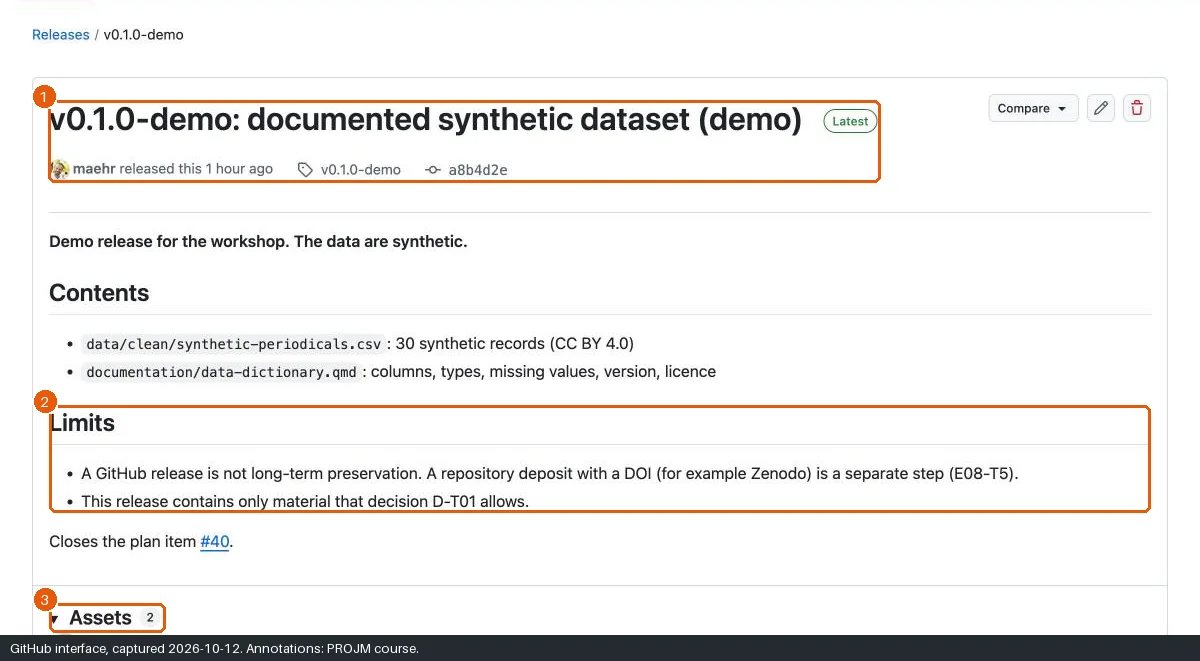
Save the release notes below as
release-notes.mdin the folder that containsprojm-thesis.Create the release. gh creates the tag
v0.1.0-demoonmainand prints the address of the release.gh release create v0.1.0-demo --title "v0.1.0-demo: documented synthetic dataset (demo)" \ --notes-file ../release-notes.mdClose E08-T3 with a link to the release.
gh release viewfinds the address of the release.gh issue close $(issue E08-T3) --comment "Released: $(gh release view v0.1.0-demo --json url --jq .url)"
Texts to copy
Data dictionary text
---
title: Data Dictionary
description: Structure, variables, and definitions of the synthetic periodical metadata.
---

This document describes `data/clean/synthetic-periodicals.csv`.

**Every record is synthetic.** The records describe periodicals that never existed.

## Overview

- **Title**: Synthetic periodical metadata, Switzerland, 1830–1960
- **Authors**: Fictional MA student (workshop example)
- **Version**: 1.0.0 (2026-10-16)
- **License**: CC BY 4.0

## Methodology

A script generated the 30 records with a fixed seed for the workshop. No record comes from a real archive.

## Missing values

Missing values are empty cells: `last_year` (5 records), `publisher` (3 records), `frequency` (2 records).

## Definitions

| Variable Name          | Description                                  | Data Type | Allowed Values                                                           |
| ---------------------- | -------------------------------------------- | --------- | ------------------------------------------------------------------------ |
| `record_id`            | Unique identifier of the record              | String    | `SYN-P001` to `SYN-P030`                                                 |
| `title`                | Title of the fictional periodical            | String    | Free text                                                                |
| `language`             | Main language (ISO 639-1)                    | String    | `de`, `fr`, `it`                                                         |
| `place_of_publication` | Town of publication                          | String    | Free text                                                                |
| `first_year`           | First year of publication                    | Integer   | 1830 to 1905                                                             |
| `last_year`            | Last year of publication                     | Integer   | Empty if not known                                                       |
| `frequency`            | Frequency of publication                     | String    | `daily`, `weekly`, `monthly`, `quarterly`, `irregular`; empty if unknown |
| `subject`              | Main subject                                 | String    | `politics`, `culture`, `religion`, `economy`, `science`, `entertainment` |
| `publisher`            | Fictional publisher or printer               | String    | Free text; empty if not known                                            |
| `scan_reuse_status`    | Reuse terms of the fictional archive's scans | String    | `open`, `attribution-required`, `unknown`, `restricted`                  |
| `digitised`            | Digitisation status                          | String    | `yes`, `no`, `partial`                                                   |
| `is_synthetic`         | Marks the record as synthetic                | Boolean   | `true`                                                                   |
Citation text
cff-version: 1.2.0
title: "Fictional master's thesis: Swiss periodicals, 1830–1960 (workshop example)"
message: >-
  This is a teaching example with synthetic data. Cite the workshop, not
  this repository, if you refer to it.
type: dataset
authors:
  - given-names: Fictional
    family-names: Student
license: CC-BY-4.0
abstract: >-
  Workshop example: 30 synthetic periodical records and the plan of a fictional
  DH master's thesis, managed with GitHub Issues and a GitHub Project.
Decision text
# Decisions

## D-T01 Rights and access for data and text

- **Date:** 2026-10-16 (workshop; fictional)
- **Context:** The thesis produces a CSV, a data dictionary, and the thesis text. The fictional archive states reuse terms for its scans.
- **Decision:**

  | Output                                 | Access                           | Licence             |
  | -------------------------------------- | -------------------------------- | ------------------- |
  | `data/clean/synthetic-periodicals.csv` | Public                           | CC BY 4.0           |
  | `documentation/data-dictionary.qmd`    | Public                           | CC BY 4.0           |
  | Scans of the fictional archive         | Not in the repository            | Archive terms       |
  | Thesis text                            | Private until the grade is final | All rights reserved |

- **Library access to the thesis:** The author and the supervisor decide together (RSL Phil.-hist. 21 Art. 32 Abs. 1).
Release notes
**Demo release for the workshop. The data are synthetic.**

## Contents

- `data/clean/synthetic-periodicals.csv`: 30 synthetic records (CC BY 4.0)
- `documentation/data-dictionary.qmd`: columns, types, missing values, version, licence

## Limits

- A GitHub release is not long-term preservation. A repository deposit with a DOI is a separate step.
- This release contains only material that decision D-T01 allows.
Expected state
If something goes wrong
| Problem | Cause | Recovery |
|---|---|---|
| The CSV download fails on the command line. | No connection, or a typing error in the path. | Open the CSV in the browser and save it as data/clean/synthetic-periodicals.csv. |
| The CSV upload fails. | The browser blocked the download. | Open the CSV, copy all lines, and create the file with Add file → Create new file. |
| The file name field does not rename. | The cursor was in the editor. | Click the file name field above the editor, then edit the name. |
| The commit did not close E08-T2. | The keyword was in the title, or the commit is on another branch. | Close the Issue by hand with a link to the commit. |
| Create a new release is missing. | The right column is collapsed. | Open https://github.com/<you>/projm-thesis/releases/new. |
| You have no time for the release. | — | Use the recovery package: download the repository ZIP (Code → Download ZIP) and name it projm-thesis-v0.1.0-demo-recovery.zip. Label it as a recovery package, not as a release. |
| A command fails. | Usually the installation, the sign-in, or the folder. | See Command-line problems, or do the step in the browser. |
Alternatives
- Pair: one person writes the data dictionary; the other corrects the citation file and writes the decision. Review each other’s pull request.
- Private path: a release in a private repository is visible only to people with access. That is the right default until you decide to publish.